
The Operating System for Modern Agricultural Procurement: Plan, Budget, Source and Deliver Poultry Projects in One Place

A practical guide to running a poultry farm or hatchery purchase as one connected project: scope, feasibility, Gantt timeline, budget, RFQs, offer comparison, delivery and commissioning — with five hands-on tutorials in the free HatchMatch workspace.
By HatchMatch Group Sourcing Desk · Last updated 2026-10-17
In short
Short answer: a poultry farm or hatchery purchase goes wrong most often between the spreadsheet and the contract — scope drifts, offers are not comparable, and the schedule lives in someone's head. HatchMatch's answer is to treat procurement as one connected project: you scope and test the economics with free calculators, turn the plan into a timeline with phases and milestones, track budget against quotes, issue an RFQ, compare offers on the same basis, and follow delivery and commissioning — with a person from HatchMatch reviewing along the way. Our ambition is to build the most capable procurement operating system for agricultural projects; this guide shows exactly what is available today and how to use it.
Key takeaways
- The workspace is called the Project Command Center.
- The figures below are hypothetical, chosen only to show how lines are structured for a 40,000-bird broiler house expansion.
- A lower equipment price can hide higher freight, duties, installation, spares or energy use.
- | Need | Generic project tool | HatchMatch workspace | |---|---|---| | Starting point | Blank board you design yourself | Poultry and hatchery templates with eight phases | | Budget vs quotes | Usually a separate spreadsheet | CAPEX/OPEX lines with estimated, quoted, committed, actual | | Offer comparison | Not built in | Shared offers with weighted criteria | | Industry tools | Not included | Linked farm-cost, hatchery and turkey calculators | | Human guidance | Not included | Human review of briefs by HatchMatch | | Flexibility for non-farm work | High | Focused on poultry projects |
- - [ ] Scope written per package (houses, climate, feeding, drinking, incubation, power).
Short answer: a poultry farm or hatchery purchase goes wrong most often between the spreadsheet and the contract — scope drifts, offers are not comparable, and the schedule lives in someone's head. HatchMatch's answer is to treat procurement as one connected project: you scope and test the economics with free calculators, turn the plan into a timeline with phases and milestones, track budget against quotes, issue an RFQ, compare offers on the same basis, and follow delivery and commissioning — with a person from HatchMatch reviewing along the way. Our ambition is to build the most capable procurement operating system for agricultural projects; this guide shows exactly what is available today and how to use it.
Definition — procurement operating system: one workspace and process that links the decisions of a capital project (what to build, how much it may cost, when each step happens, who supplies what, and whether it was delivered as agreed) so that each step uses the results of the previous one instead of starting from a blank document.
Editorial note: written by the HatchMatch Group Sourcing Desk on 17 October 2026. Every feature described here was tested in the live workspace on that date, and the screenshots are real captures of an example project. Budget figures are hypothetical. HatchMatch is a supplier-neutral, human-reviewed procurement service; it does not manufacture equipment, build farms or guarantee results.
What does the journey from idea to first flock look like?
1. Idea and scope — write the goal in one sentence: species (broiler, layer, breeder, hatchery, turkey, duck or goose), capacity, new build or expansion, country. 2. Feasibility — run the farm-cost calculator for CAPEX, yield, break-even and payback scenarios from your own inputs; hatcheries add the hatchery capacity calculator, turkey projects the turkey calculators. 3. Knowledge and research — check the Knowledge Center guides and the daily Industry Intelligence feed for avian-influenza, regulation and market items that affect timing. 4. Site and utilities — confirm power, water, access and permits with local authorities before ordering anything with a long lead time. 5. Biosecurity — zone the site, traffic and cleaning flows; the WOAH Terrestrial Code chapter on poultry biosecurity is a sound reference. 6. Specification — houses, feeding, drinking and ventilation, or incubators, hatchers and hatchery rooms, written so that suppliers quote the same scope. 7. RFQs and offer comparison — send one structured brief, then compare total cost, lead time and technical fit — not the headline price. 8. Delivery, installation and commissioning — track shipping, installation milestones, training and the first placement or first setting.
Want these figures for your own site, capacity and country? A HatchMatch specialist builds the budget with you — no buyer fees.
Start free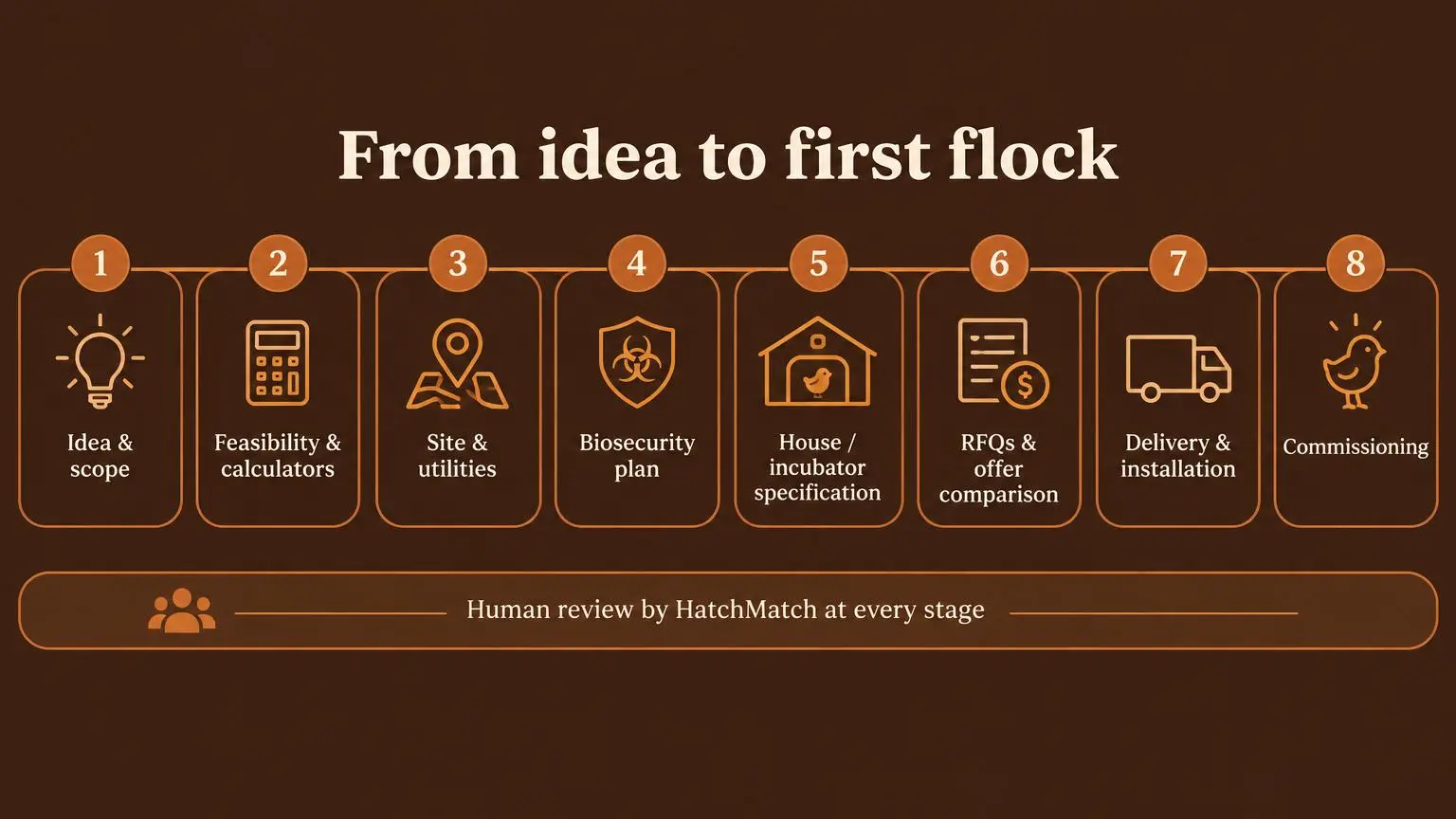
How do you use the free workspace? Five hands-on tutorials
The workspace is called the Project Command Center. It is free for buyers with a HatchMatch account and private to you and the people you invite. Start at the free project planning workspace page or go straight to your projects.
### Tutorial 1 — How do I start a project?
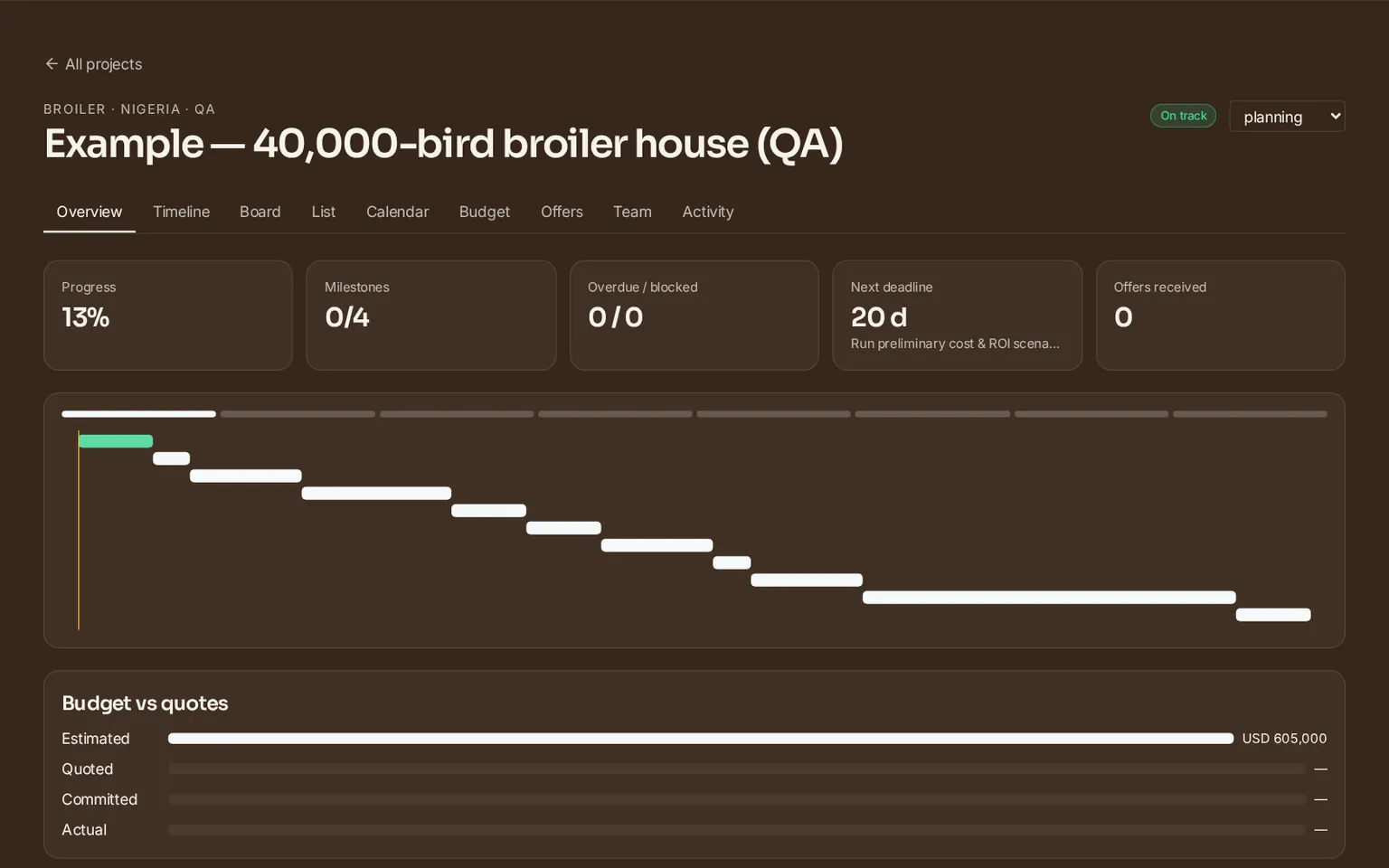
1. Sign in and open Project Command Center from your account menu (or go to /projects). 2. Enter a project name, choose the type (broiler, layer, breeder, hatchery, turkey, duck or goose), add the country and, if you know it, a target completion date. 3. Keep Start from template ticked. The workspace adds tasks for all eight phases, chained in order, with milestones marked by a diamond. 4. Open the Overview tab: you see progress, milestones, overdue and blocked tasks, the next deadline, and a compact timeline with today's line.
### Tutorial 2 — How do I prepare a procurement timeline (Gantt)?
1. Go to List. For each task set start date, due date, owner or assignee and percent complete; add subtasks for detail such as "quote for backup generator". 2. Use Depends on to link tasks — for example, "Issue RFQ packages" depends on the house or incubator specification. 3. Open Timeline and switch between weeks and months. The highlighted chain is the critical path — the tasks that set your finish date; an amber ring warns that a task starts before the task it depends on ends. 4. Use Board to drag tasks between To do, In progress, Blocked and Done, and Calendar to see due dates by month.
### Tutorial 3 — How do I create an RFQ?
1. Finish the specification tasks first; vague scope produces offers you cannot compare. 2. Open the project request wizard or the poultry project quote form and describe capacity, species, site, budget range and timeline. Buyers do not pay for this service. 3. Every brief is reviewed by a person; HatchMatch aims to reply within two business days and contacts suitable independent suppliers on your behalf. Supplier participation and timing are not guaranteed. 4. Record the RFQ as done in your workspace so the timeline moves to the comparison phase.
### Tutorial 4 — How do I compare total supplier costs?
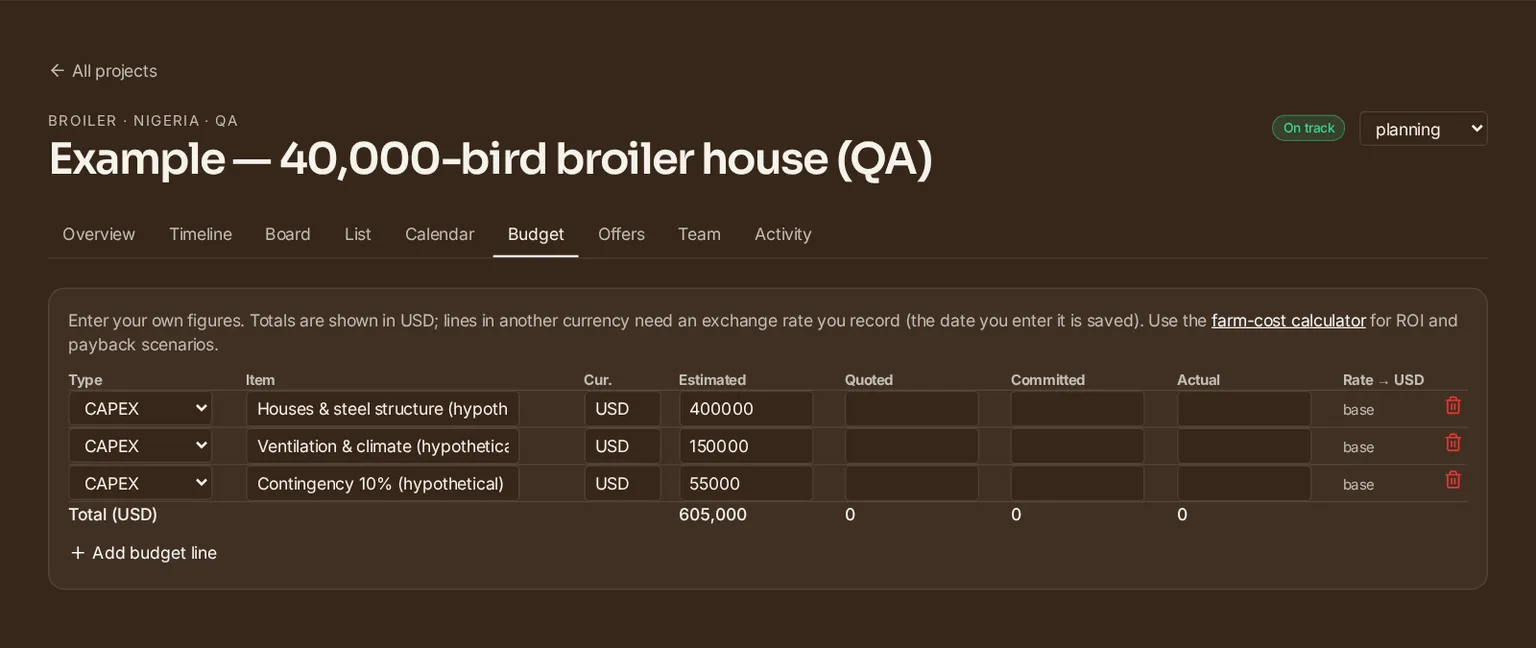
1. Open Budget and add CAPEX, OPEX and contingency lines. For each line record estimated, quoted, committed and actual amounts. 2. If a quote is in another currency, enter the exchange rate you used; the date is saved with it. Lines without a rate are left out of totals rather than guessed. 3. When the HatchMatch team shares offers with you, the Offers tab shows them under neutral aliases with price, lead time and 1–5 scores for price, technical fit, lead time, service and references, combined into a weighted score. 4. Compare like with like: same scope, same Incoterm, same currency date, warranty and spares included or excluded explicitly.
### Tutorial 5 — How do I monitor milestones and risk?
1. Check the health badge: On track, At risk (a blocked task, or a deadline within seven days at under half complete) or Late (an open task past its due date). 2. Mark a task Blocked and write the blocker — for example "waiting for grid connection approval" — so everyone sees why. 3. Read Planning checks on the Overview: automatic, rule-based reminders (not AI) such as a missing target date, a phase with no task, or a dependency conflict. 4. Invite your partner, engineer or consultant under Team as editor or viewer; every change and comment is logged under Activity.
What could a budget look like? A hypothetical poultry example
The figures below are hypothetical, chosen only to show how lines are structured for a 40,000-bird broiler house expansion. They are not prices, benchmarks or quotes. Your own numbers should come from the farm-cost calculator and from real offers.
| Budget line (hypothetical) | Type | Illustrative amount |
|---|---|---|
| House structure, roofing, insulation | CAPEX | USD 400,000 |
| Ventilation, heating and climate control | CAPEX | USD 150,000 |
| Contingency (about 10%) | Contingency | USD 55,000 |
| Electricity and fuel per year | OPEX | From your own tariff |
For a hatchery, replace the lines with setters and hatchers, room ventilation and cooling water, egg and chick handling and standby power; for turkey, duck or goose projects, follow the species-specific housing and brooding requirements — never copy chicken defaults.
Why compare total cost instead of headline price?
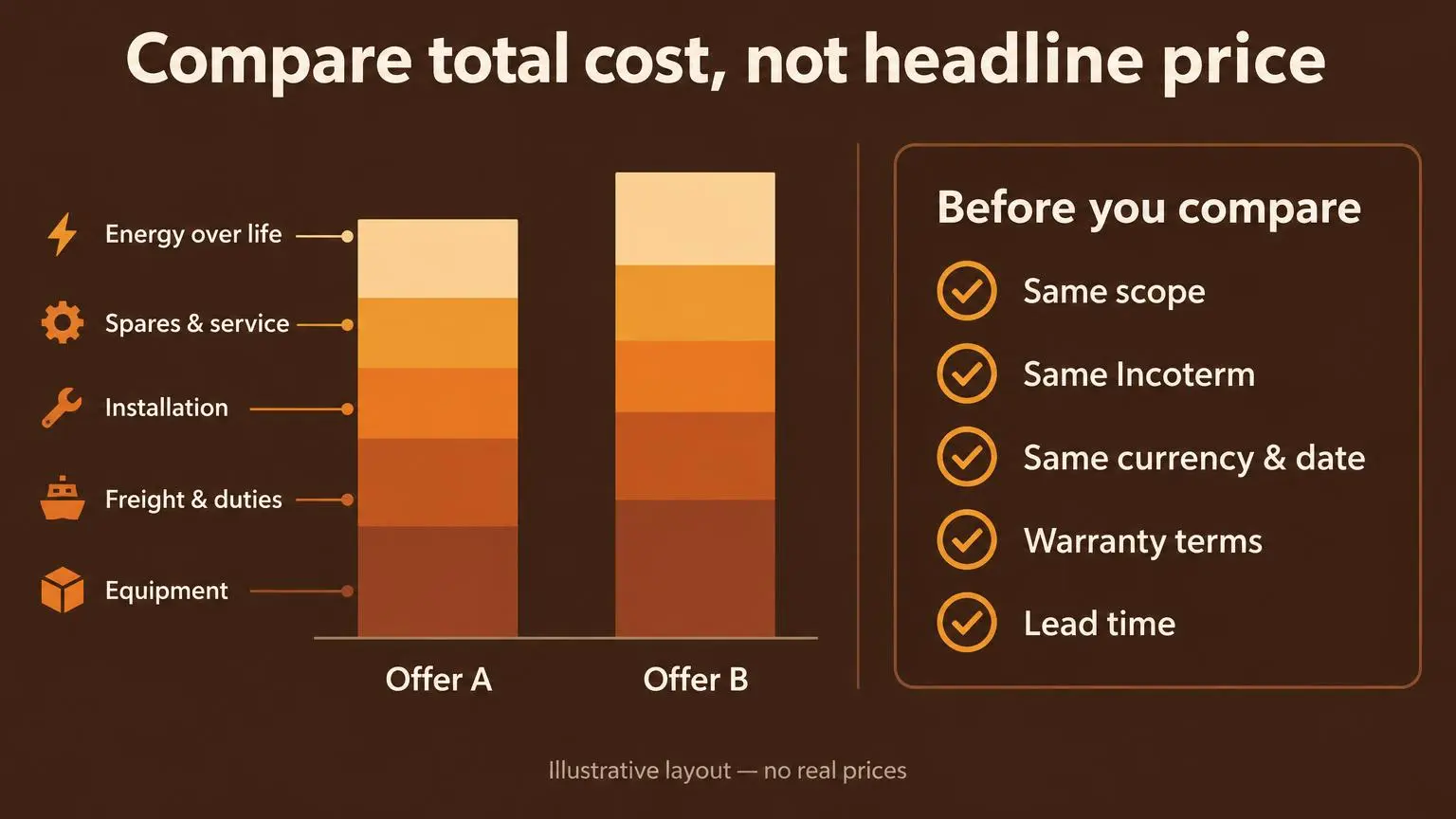
A lower equipment price can hide higher freight, duties, installation, spares or energy use. Put every offer on the same basis before scoring it.
For incubation equipment, the useful unit is cost per saleable chick over the equipment's life, not cost per egg position in a catalogue.
How is this different from a generic project management tool?
| Need | Generic project tool | HatchMatch workspace |
|---|---|---|
| Starting point | Blank board you design yourself | Poultry and hatchery templates with eight phases |
| Budget vs quotes | Usually a separate spreadsheet | CAPEX/OPEX lines with estimated, quoted, committed, actual |
| Offer comparison | Not built in | Shared offers with weighted criteria |
| Industry tools | Not included | Linked farm-cost, hatchery and turkey calculators |
| Human guidance | Not included | Human review of briefs by HatchMatch |
| Flexibility for non-farm work | High | Focused on poultry projects |
Free checklist before you sign a supply contract
- [ ] Scope written per package (houses, climate, feeding, drinking, incubation, power). - [ ] Feasibility scenario saved with its assumptions. - [ ] Permits and utilities confirmed in writing. - [ ] Biosecurity zoning agreed before layout is frozen. - [ ] All offers on the same Incoterm, currency date and scope. - [ ] Lead times placed on the timeline; critical path checked. - [ ] Installation, commissioning and training responsibilities named. - [ ] Contingency line kept until commissioning.
What is free, and what is not?
The guides, calculators, Industry Intelligence feed and the Project Command Center are free for buyers; there is no paywall on core planning. Submitting a project request is free for buyers; HatchMatch focuses on commercial projects from roughly USD 250,000. Financing guides are available in the Financing Center; partner financing depends on each case and is not guaranteed. Engineering or bespoke consulting, if needed, is agreed separately in writing.
Frequently asked questions
Is the HatchMatch project workspace really free? Yes. Creating projects, timelines, budgets and inviting collaborators is free for buyers with an account.
Who can see my project? Only you, collaborators you invite with a verified account, and HatchMatch staff. Projects are never public.
Does HatchMatch fill in prices? No. You enter your own figures; quoted amounts come only from real offers. Use the farm-cost calculator for preliminary scenarios.
Will I see supplier names? Shared offers appear under neutral aliases. Supplier details are disclosed only with explicit approval as part of the managed process.
Is there an AI assistant? Not yet. The Planning checks are automatic rules and are labelled as such.
What should you do next?
Start a free project, test the numbers in the farm-cost calculator, and when your specification is ready, request supplier offers for human review.
Sources: WOAH Terrestrial Code — biosecurity in poultry production; Cobb Hatchery Management Guide; ICC — Incoterms® rules; PMI — What is project management. Cover and infographics are AI-generated illustrations; screenshots are real captures of an example project.
Frequently asked questions
- Is the HatchMatch project workspace really free?
- Yes. Creating projects, timelines, budgets and inviting collaborators is free for buyers with an account.
- Who can see my project?
- Only you, collaborators you invite with a verified account, and HatchMatch staff. Projects are never public.
- Does HatchMatch fill in prices?
- No. You enter your own figures; quoted amounts come only from real offers. Use the farm-cost calculator for preliminary scenarios.
- Will I see supplier names?
- Shared offers appear under neutral aliases. Supplier details are disclosed only with explicit approval as part of the managed process.
- Is there an AI assistant?
- Not yet. The Planning checks are automatic rules and are labelled as such.
More buyer questions are answered in our poultry procurement FAQ — also available in Español, Français, Português, Deutsch, العربية, Русский, Türkçe, Tiếng Việt.
From this article to a procurement-ready RFQ
HatchMatch Group is an independent sourcing desk — not a manufacturer or EPC contractor. These are the four steps we actually use with commercial poultry and hatchery buyers. If you are still deciding scope, start with what commercial poultry equipment includes and how suppliers are compared.
- 1. Plan the projectCapacity, climate and house layout in one guided workflowOpen
- 2. Build the RFQScope, specifications and comparable line itemsOpen
- 3. Submit the requestReviewed manually before HatchMatch contacts any supplier on the buyer's behalfOpen
- 4. Track and compareFollow status and normalise supplier responsesOpen
Prefer the numbers first? Start with the poultry project cost calculator or browse the project planning guides.